How Do 360 Cameras Work?
Cameras have always been about choosing a frame, deciding what matters, and leaving the rest out. 360 cameras challenge that idea by capturing everything around them at once, creating a more immersive way to record moments as they actually happen.
Instead of pointing a lens in one direction, these cameras are built to see in all directions simultaneously. This shift changes how photos and videos are created, viewed, and shared, especially for travel, virtual tours, sports, and interactive storytelling.
To understand this technology, many people ask how do 360 cameras work and what makes them different from standard cameras. The answer lies in their unique lens setup, internal processing, and the way multiple images are combined into one seamless view.
By recording a complete spherical scene, 360 cameras give viewers control over perspective after the recording is finished. This introduction sets the stage for exploring the mechanics behind that experience and explains why this technology continues to grow in popularity across creative and professional fields.
How Do 360 Cameras Work?
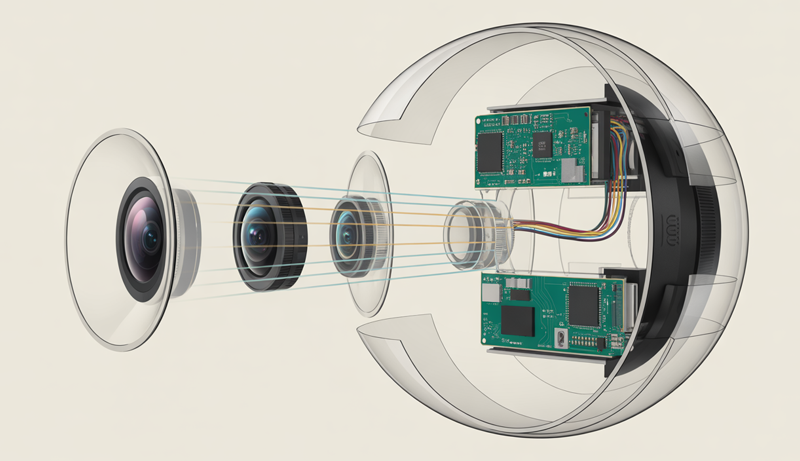
360 cameras work by using two or more ultra-wide or fisheye lenses placed on opposite sides of the device. Each lens captures more than a 180-degree field of view, allowing the camera to record everything around it at the same time. This design eliminates blind spots and ensures a complete spherical image or video.
When recording begins, each lens captures its own footage independently. These images overlap slightly, which is essential for combining them later. The camera’s internal sensors and processors collect this visual data simultaneously, keeping timing and exposure aligned so the final result feels natural and smooth.
A key part of understanding how do 360 cameras work is the stitching process. Specialized software inside the camera or a companion app automatically merges the footage from each lens. This software analyzes overlapping areas and blends them together, removing visible seams to create one continuous 360-degree view.
Once stitched, the footage is converted into a format known as an equirectangular projection. This flat-looking image actually contains visual information for every direction—up, down, and all around. Platforms like YouTube or VR apps then map this data onto a virtual sphere for interactive viewing.
During playback, viewers control what they see by dragging the screen, moving a phone, or using a VR headset. Instead of watching a fixed frame, they explore the scene freely, making 360 cameras a powerful tool for immersive storytelling, education, and virtual experiences.
This combination of wide-angle lenses, intelligent stitching, and interactive playback is what makes 360 cameras unique compared to traditional cameras.
What Makes a Camera “360 Degrees”?
A camera is considered “360 degrees” because it captures the entire environment around it in a single shot, rather than focusing on one direction. Unlike traditional cameras that record a limited frame, a 360 camera records a full spherical view, covering everything horizontally and vertically. This capability depends mainly on two factors: an extremely wide field of view and a specialized multi-lens design that works together to capture the complete scene.
Field of View Explained
The defining feature of a 360 camera is its ability to capture a full 360-degree horizontal view along with nearly 180 degrees vertically. Horizontally, this means the camera sees everything around it—front, back, left, and right—without the need to rotate. Vertically, the coverage extends from near the ground all the way up to the sky, forming a complete visual sphere when combined.
To achieve this level of coverage, standard lenses are not sufficient. Traditional wide-angle lenses usually capture between 90 and 120 degrees, which still leaves large portions of the scene unseen. Ultra-wide or fisheye lenses are required because they can capture more than 180 degrees in a single frame. This extreme viewing angle allows each lens to see beyond what the human eye naturally perceives, bending and stretching the image toward the edges.
The distortion caused by these lenses is intentional and necessary. Straight lines appear curved near the edges, but this distortion allows the camera to gather far more visual data than a normal lens. Later, software corrects and reshapes this data into a format suitable for immersive viewing. Without such a wide field of view, it would be impossible to record an uninterrupted, fully navigable environment.
This extensive field of view is what enables viewers to look in any direction during playback. Whether the camera is placed in the center of a room, on a helmet, or mounted on a vehicle, the wide coverage ensures no important visual detail is missed, making the experience feel natural and immersive.
Dual-Lens (or Multi-Lens) Design
Most consumer 360 cameras rely on a dual-lens design, where two fisheye lenses are positioned back-to-back on opposite sides of the camera body. Each lens is responsible for capturing roughly half of the surrounding environment. One lens records everything in front of it, while the other records everything behind it, with both lenses covering more than 180 degrees to create overlap.
This overlap is critical. By capturing slightly more than half of the scene, each lens provides shared visual areas that help the camera align and merge the footage accurately. Without overlap, visible seams would appear where the two images meet. The back-to-back placement ensures that, together, the lenses capture a complete spherical view without gaps.
In more advanced or professional 360 cameras, a multi-lens setup may be used instead of just two lenses. These designs can include four, six, or even more lenses, each capturing a specific portion of the environment. While more complex, this approach can improve image quality, reduce distortion, and enhance depth perception, especially in high-resolution or cinematic applications.
Regardless of the number of lenses, the principle remains the same: each lens captures a portion of the world, and the camera’s internal system synchronizes them. The final result is a unified visual experience that allows viewers to freely explore the scene. This lens-based architecture is the foundation that truly makes a camera “360 degrees.”
How 360 Cameras Capture Images and Video
360 cameras capture images and video by combining specialized optics with advanced sensor technology to record an entire scene at once. Instead of framing a single direction, these cameras collect visual data from all angles simultaneously. This process relies heavily on fisheye lenses and image sensors working together to gather, synchronize, and prepare immersive visual information.
Fisheye Lens Technology
A fisheye lens is an ultra-wide-angle lens designed to capture an extremely broad field of view, often exceeding 180 degrees. Unlike standard lenses that aim to keep lines straight and proportions natural, fisheye lenses intentionally bend and curve the image. This allows a single lens to see far more of the surrounding environment than traditional optics ever could.
The distortion created by a fisheye lens is not a flaw but a functional necessity. To record a full spherical scene, the lens must stretch the edges of the image so that peripheral details are pulled into the frame. Without this distortion, large portions of the environment would remain outside the camera’s view, making full 360-degree coverage impossible.
Each fisheye lens in a 360 camera captures a hemispherical image that includes not just what is directly in front of it, but also much of what lies to the sides, above, and below. This exaggerated perspective ensures overlap between lenses, which is essential for later image alignment. The curved appearance of objects near the edges is a direct result of compressing a wide scene into a circular or near-circular frame.
During processing, software compensates for this distortion by mathematically reshaping the image into a usable format. While the raw footage looks warped, it contains all the visual data needed to recreate a realistic environment. The fisheye lens, therefore, acts as the foundation of 360 capture, prioritizing coverage over visual accuracy at the recording stage.
Camera Sensors and Image Capture
Behind each fisheye lens sits an image sensor responsible for converting incoming light into digital data. These sensors play a critical role in determining image quality, color accuracy, and low-light performance. In a 360 camera, multiple sensors work together, each dedicated to the lens positioned above it.
When recording begins, light passes through both fisheye lenses and hits their respective sensors at the same time. Each sensor measures the intensity and color of the light reaching millions of individual pixels. This simultaneous capture is essential, especially for video, as even slight timing differences could cause motion mismatches between the lenses.
The sensors record raw visual data independently, but they are synchronized by the camera’s internal system. Exposure, white balance, and frame rate are matched so that both halves of the scene look consistent. This synchronization ensures that when the images are later combined, transitions between them appear smooth and natural rather than abrupt.
Because 360 cameras capture everything at once, sensors must handle a wide range of lighting conditions within a single shot. Bright skies and dark shadows often exist in the same frame, requiring sensors with strong dynamic range. The data collected by both sensors forms the complete visual foundation that is later stitched, mapped, and transformed into an immersive 360-degree image or video.
How Image Stitching Works in 360 Cameras
Image stitching is a core process that turns separate camera views into a single immersive scene. Because 360 cameras rely on multiple lenses, the raw footage is captured in parts rather than as one image. Stitching software merges these parts into a seamless spherical photo or video, allowing viewers to freely look around without noticing where one image ends and another begins.
What Is Image Stitching?
Image stitching is the process of combining two or more images into one continuous visual scene. In simple terms, it acts like a digital glue that joins separate pieces of footage so they appear as a single, uninterrupted image. For 360 cameras, stitching is not optional—it is essential for creating a full spherical view.
Each lens in a 360 camera captures only a portion of the environment. These individual images overlap slightly, but on their own they cannot provide a complete experience. Stitching takes these overlapping sections and blends them together, aligning edges and correcting perspective so the scene looks natural when viewed.
Without stitching, 360 content would appear as two distorted hemispheres rather than a unified environment. Viewers would see harsh borders, broken lines, and mismatched angles. Stitching solves this by analyzing shared visual details, such as shapes, textures, and patterns, and using them as reference points for alignment.
This process allows the final output to be mapped onto a virtual sphere, which is what enables interactive viewing. Whether the content is displayed on a phone, computer, or VR headset, stitching ensures that movement between viewing angles feels smooth and continuous, making the immersive effect possible.
Stitching Software and Algorithms
Stitching is handled by specialized software that can run either directly inside the camera or through a companion mobile or desktop app. In-camera stitching processes footage instantly, allowing quick sharing and real-time previews. App-based stitching, on the other hand, often provides higher accuracy and more control, making it popular for professional workflows.
The software relies heavily on overlapping image areas captured by each lens. These shared regions give the algorithm visual reference points to determine how the images should align. By matching patterns and edges within these overlaps, the software calculates how to blend the images without visible seams.
Advanced stitching systems use optical flow algorithms to track motion across frames, especially in video. Optical flow helps predict how objects move between lens views, reducing jitter and improving continuity. This is particularly important when subjects move close to the camera or when the camera itself is in motion.
Modern 360 cameras also incorporate AI-based correction. Artificial intelligence helps detect objects, adjust seam placement dynamically, and compensate for complex movement. These intelligent systems improve stitching accuracy by adapting in real time, producing smoother results even in challenging environments with motion or uneven lighting.
Common Stitching Challenges
Despite advanced software, stitching is not always perfect, and several common challenges can arise. One of the most noticeable issues is stitch lines—visible seams where images meet. These usually occur when alignment is slightly off or when the scene lacks enough overlapping detail for accurate blending.
Parallax errors are another frequent problem. Parallax happens when objects close to the camera appear differently from each lens’s perspective. Because each lens views the object from a slightly different angle, stitching software may struggle to align it correctly, resulting in warped or duplicated shapes along the seam.
Lighting mismatches can also affect stitching quality. If one lens captures a brighter or darker exposure than the other, the seam between them becomes more noticeable. Differences in color temperature or shadow detail can break immersion and draw attention to the stitched areas.
To minimize these issues, 360 cameras carefully synchronize sensors and adjust exposure automatically. However, challenging scenes—such as low light, fast motion, or objects very close to the camera—still test the limits of stitching technology. These challenges highlight why stitching remains one of the most complex aspects of 360 camera systems.
How 360 Video Is Processed and Stored
Once a 360 camera captures and stitches footage, the video must be processed into a format that devices and platforms can understand. This processing stage reshapes spherical visual data into a standardized layout and encodes it into video files suitable for editing, sharing, and playback. Projection methods, file formats, resolution, and data rates all play a critical role in how 360 video is stored and experienced.
Equirectangular Projection Explained
An equirectangular image is a flat, rectangular representation of a full spherical scene. It maps the entire 360-degree horizontal view and nearly 180 degrees of vertical view onto a single frame. In this projection, the left and right edges of the image connect seamlessly, while the top and bottom represent the vertical extremes of the scene.
This projection method is widely used because it is compatible with standard video formats and players. While it may look unusual, it contains all the information needed to reconstruct a virtual sphere during playback. Video platforms and VR players recognize this layout and remap it onto a 3D sphere that viewers can explore interactively.
The reason 360 footage looks stretched when viewed flat is due to how spherical data is compressed into a rectangle. Areas near the top and bottom of the image—representing the sky and ground—are stretched horizontally to fit the rectangular frame. This distortion is not a flaw but a mathematical result of flattening a curved surface.
When viewed through a 360-compatible player, this stretching disappears because the image is wrapped back into its original spherical form. The equirectangular projection acts as a practical middle step, allowing immersive content to be stored, edited, and streamed using existing video infrastructure without losing directional information.
File Formats and Resolution
Most 360 videos are stored using standard video formats such as MP4 or MOV. These formats are widely supported across devices, editing software, and online platforms, making them ideal for distribution. The key difference is not the file type itself, but the metadata embedded within the file that tells players the video is 360-degree content.
360 videos require significantly higher resolution than traditional videos to maintain clarity. Because the entire scene is captured in one frame, only a portion of the resolution is visible at any given time during playback. For example, a 5.7K 360 video may display closer to standard HD quality in the viewer’s field of view. Lower resolutions would result in noticeable softness and loss of detail.
Higher resolution leads directly to higher bitrate requirements. Bitrate determines how much data is processed per second, affecting video quality and file size. 360 footage often uses higher bitrates to preserve detail across the entire spherical image, especially for fast motion or complex scenes.
These factors increase storage demands. 360 video files are larger and consume more memory on cameras, memory cards, and editing systems. Efficient compression helps manage file size, but storage planning remains essential when working with 360 content, particularly for long recordings or professional production workflows.
How Viewing 360 Content Works
Viewing 360 content is an interactive experience that allows users to control their perspective rather than watch a fixed frame. Once a 360 video or image is processed and uploaded to a compatible platform, the playback system maps the content onto a virtual sphere. Viewers then explore that sphere using touch, motion, or head movement, depending on the device.
Viewing on Phones and Computers
On phones and computers, 360 content is viewed through interactive players that respond to user input. The most common interaction method is drag-to-look, where users click and drag with a mouse or swipe with a finger to change the viewing direction. This action rotates the virtual camera inside the spherical video, revealing different parts of the scene.
Mobile devices add another layer of immersion through gyroscope support. When enabled, the phone’s built-in motion sensors track how the device is tilted or rotated. As the user moves the phone, the view shifts naturally, making it feel as though the device itself is a window into the recorded environment. This creates a more intuitive experience compared to manual dragging.
On computers, keyboard controls may also be available, allowing users to look around using arrow keys or on-screen navigation icons. The experience remains smooth because the player continuously adjusts the viewing angle rather than switching between fixed camera shots.
Despite being displayed on flat screens, this method still provides a sense of presence. While users cannot move physically within the scene, they can freely explore every direction, which is the defining characteristic of 360 content on traditional devices.
Viewing in VR Headsets
VR headsets offer the most immersive way to experience 360 content by using head-tracking technology. Head-tracking sensors monitor the exact position and rotation of the user’s head in real time. As the viewer looks up, down, or to the side, the video responds instantly, creating a natural and responsive viewing experience.
Unlike phone or computer viewing, VR headsets eliminate the need for manual controls. The content reacts purely to head movement, which makes exploration feel effortless and more realistic. The spherical video is projected around the user, filling their entire field of view and blocking out the real world.
It is important to understand the difference between 360 video and true VR. A 360 video allows viewers to look around from a fixed point but does not let them move through the environment. True VR, often created with 3D engines, allows positional movement and interaction with objects.
Even with this limitation, 360 video works exceptionally well in VR headsets for storytelling, travel experiences, and immersive documentation. Head-tracking transforms passive viewing into an active experience, making viewers feel present within the recorded moment.
How 360 Cameras Compare to Regular Cameras
| Feature | 360 Cameras | Regular Cameras |
|---|---|---|
| Field of View | Capture a full 360° horizontal and ~180° vertical view | Capture a limited field of view (framed in one direction) |
| Lenses | Use dual or multiple fisheye lenses | Use a single standard, wide-angle, or telephoto lens |
| Perspective Control | Viewers choose the angle during playback | Photographer/videographer controls the frame while shooting |
| Image Distortion | Intentional distortion corrected through software | Minimal distortion, usually corrected optically |
| Image Stitching | Required to merge multiple lens views | Not required |
| Viewing Experience | Interactive and immersive | Fixed and passive |
| Resolution Needs | Requires very high resolution for clarity | Lower resolution can still look sharp |
| File Size | Larger files due to full-scene capture | Smaller file sizes |
| Best Use Cases | VR content, virtual tours, action shots, immersive storytelling | Photography, filmmaking, portraits, landscapes |
| Ease of Editing | More complex due to stitching and projection | Simpler and widely supported editing workflows |
Advantages and Limitations of 360 Cameras
360 cameras offer a unique way to capture and experience visual content by recording everything around the camera at once. This approach opens new creative possibilities but also introduces technical and practical challenges. Understanding both the advantages and limitations helps clarify where 360 cameras excel and where traditional cameras may still be the better choice.
Capture Everything at Once
One of the biggest advantages of 360 cameras is their ability to capture the entire environment simultaneously. Unlike regular cameras that only record what is placed within a chosen frame, a 360 camera records all directions—front, back, sides, above, and below—in a single shot. This makes them extremely useful in situations where events happen unpredictably.
Because nothing is left outside the frame, users never have to worry about missing key moments. This is especially valuable for action sports, travel experiences, live events, or documentary-style recordings where there is no second chance to reposition the camera. Everything that happens around the camera is preserved and can be explored later.
This all-in-one capture also allows creators to decide the best angles after recording. Instead of committing to a viewpoint during filming, editors can reframe the footage in post-production, selecting the most engaging perspectives. This flexibility gives creators more control and reduces pressure during the recording process.
For solo creators or small teams, capturing everything at once simplifies production. There is no need for multiple cameras or camera operators to cover different angles, making 360 cameras efficient tools for comprehensive scene coverage.
No Need to Aim While Recording
Another major advantage of 360 cameras is that they eliminate the need to aim or frame shots while recording. Since the camera sees in every direction, users can place it in position and focus entirely on the activity rather than camera operation. This hands-free approach is especially appealing for creators who need to stay engaged in the moment.
For example, athletes, travelers, or educators can concentrate on performance or storytelling instead of worrying about camera angles. The camera becomes a passive observer, recording everything without constant adjustment. This leads to more natural and uninterrupted footage.
This feature also reduces the skill barrier for beginners. Traditional cameras require knowledge of framing, composition, and timing. With 360 cameras, even inexperienced users can capture usable content without technical expertise, as framing decisions are deferred until editing.
Additionally, this flexibility is helpful in confined or fast-moving environments. Whether mounted on a helmet, vehicle, or tripod, the camera does not need repositioning when the subject changes direction. The result is smoother, more adaptable content creation with less manual effort during filming.
Ideal for Immersive Content
360 cameras are particularly well suited for immersive content designed to place viewers inside the scene. Instead of passively watching from a fixed angle, viewers actively explore the environment, choosing where to look. This creates a stronger sense of presence and engagement.
This immersive quality makes 360 cameras ideal for virtual tours, travel experiences, educational simulations, and VR-compatible content. Viewers feel as though they are standing in the location rather than watching it from a distance. This is especially powerful for storytelling that relies on atmosphere and spatial awareness.
Brands and educators also benefit from this immersive format. Virtual walkthroughs, training simulations, and interactive demonstrations become more engaging when users can look around freely. The ability to control perspective increases attention and retention compared to traditional video formats.
Because of this, 360 cameras have become valuable tools in fields such as real estate, tourism, journalism, and experiential marketing. Their strength lies not in image perfection, but in the experience they create for the viewer.
Lower Sharpness Compared to Standard Cameras
Despite their strengths, 360 cameras often produce lower perceived sharpness compared to standard cameras. Since the camera captures the entire scene in one frame, resolution is spread across all directions. At any given moment, viewers only see a portion of that resolution.
Even when using high-resolution sensors, the visible detail in a single viewing direction may appear softer than footage from a traditional camera focused on that same area. This can be noticeable when watching on large screens or zooming in on specific details.
This limitation becomes more apparent in professional workflows where image clarity is critical, such as cinematic production or detailed product visuals. While reframing is possible, heavy cropping further reduces sharpness.
As a result, 360 cameras prioritize coverage and immersion over raw image quality. For creators whose primary goal is visual precision rather than experience, this trade-off can be a significant drawback.
Complex Editing Workflow and Stitching Artifacts
Editing 360 content is more complex than editing traditional photos or videos. The workflow often involves stitching, projection management, specialized software, and platform-specific export settings. This adds time and learning requirements, especially for beginners.
Stitching artifacts are another common limitation. Visible stitch lines, warped objects, or parallax errors can appear where images from different lenses are joined. These issues are most noticeable when objects are close to the camera or when lighting differs between lenses.
Lighting mismatches and fast motion can also challenge stitching algorithms, breaking immersion and drawing attention to technical flaws. While software continues to improve, these artifacts are still difficult to eliminate entirely.
Together, complex editing and stitching limitations mean that 360 cameras require more patience and post-production effort. While the results can be immersive and engaging, they demand a higher tolerance for technical imperfections compared to standard cameras.
Common Uses of 360 Cameras
360 cameras are widely used in travel and tourism to capture immersive experiences. Travelers use them to document destinations in a way that allows viewers to look around freely, creating a stronger sense of presence than traditional photos or videos. These recordings are especially popular for sharing adventures on social media and travel platforms.
In real estate and hospitality, 360 cameras are commonly used for virtual tours. Properties, hotels, and rental spaces can be explored remotely, allowing potential buyers or guests to view rooms, layouts, and surroundings interactively. This helps save time and gives viewers a more realistic understanding of a space before visiting in person.
Action sports and outdoor activities are another major use case. Mounted on helmets, bikes, or vehicles, 360 cameras capture fast-moving scenes without requiring precise framing. Athletes can stay focused on performance while the camera records everything, letting editors choose the most exciting angles later.
Education and training also benefit from 360 content. Virtual field trips, safety simulations, and instructional videos allow learners to explore environments at their own pace. This immersive approach improves engagement and helps explain complex situations more effectively than flat video.
360 cameras are also used for events such as concerts, conferences, and weddings. By recording the full environment, viewers who could not attend in person can still experience the atmosphere. This makes 360 cameras valuable tools for documentation, live streaming, and interactive storytelling.
Frequently Asked Questions (FAQs)
How Do 360 Cameras Capture Everything Around You?
A 360 camera captures everything around you by using two or more ultra-wide fisheye lenses placed on opposite sides of the camera. Each lens records more than half of the surrounding scene at the same time. The camera then combines these views so you can look in any direction during playback, instead of being limited to a single frame.
Why Do 360 Cameras Use Fisheye Lenses?
360 cameras use fisheye lenses because standard lenses cannot capture a wide enough view. Fisheye lenses intentionally create distortion so more of the environment fits into a single image. This distortion is later corrected by software, allowing you to experience a full spherical view without missing visual details around you.
How Does Image Stitching Work in 360 Cameras?
Image stitching is the process that merges footage from multiple lenses into one seamless image or video. The camera or its companion app analyzes overlapping areas between lens views and blends them together. This step is essential so you can view 360 content smoothly without visible seams when you move your perspective.
Why Does 360 Video Look Stretched When Viewed Flat?
When you view 360 footage on a regular screen, it looks stretched because it is displayed in an equirectangular format. This format flattens a spherical scene into a rectangle so it can be stored and edited. Once played in a 360-compatible viewer, the video wraps back into a sphere and looks natural.
Do 360 Cameras Record Video Differently Than Regular Cameras?
Yes, 360 cameras record video differently by capturing the entire environment at once rather than a single direction. This means resolution is spread across the whole scene. When you watch the video, only part of that resolution is visible at a time, which is why 360 videos require higher overall resolution to stay clear.
What Devices Can You Use to View 360 Content?
You can view 360 content on smartphones, computers, and VR headsets. On phones and computers, you drag or swipe to look around. On VR headsets, head-tracking allows you to explore the scene naturally by moving your head. This flexibility makes 360 cameras ideal for immersive experiences.
Conclusion
Understanding how modern imaging has evolved makes it easier to appreciate how do 360 cameras work in real-world situations. By using multiple ultra-wide lenses, advanced sensors, and intelligent stitching software, these cameras capture complete environments rather than a single viewpoint. This approach changes how moments are recorded, edited, and experienced.
The process does not stop at recording. From fisheye lens distortion to image stitching, equirectangular projection, and interactive playback, each stage plays a vital role. Together, these technologies allow viewers to explore scenes freely on phones, computers, or VR headsets, creating a sense of presence that traditional cameras cannot match.
As immersive media continues to grow, knowing how do 360 cameras work helps you decide when and how to use them effectively. While they have limitations, their ability to capture everything at once makes them powerful tools for storytelling, education, travel, and virtual experiences.