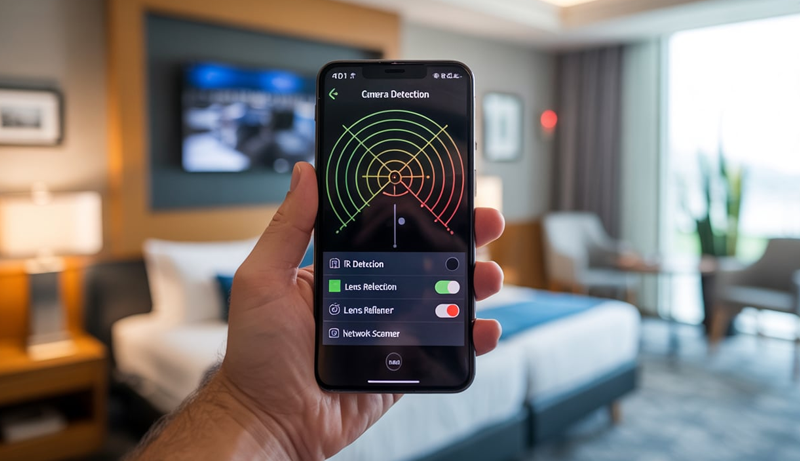
How to Detect Hidden Cameras With Phone (Step-by-Step Guide)
Staying in a hotel room, rental apartment, or even a changing room should feel private, yet many people worry about being watched without their knowledge. With tiny cameras becoming cheaper and easier to hide, concerns about personal privacy are more real than ever.
Most people don’t realize that the smartphone in their pocket can be a powerful tool for personal safety. Modern phones come equipped with sensors, cameras, and connectivity features that can help uncover suspicious devices in everyday environments, without needing professional equipment.
Learning how to detect hidden cameras with phone empowers you to take control of your surroundings. Instead of relying on fear or guesswork, you can use simple, practical methods to scan rooms, check unusual objects, and identify warning signs quickly and discreetly.
This guide focuses on realistic, phone-based techniques that everyday users can apply while traveling or at home. By understanding these methods, you can move through unfamiliar spaces with greater confidence and peace of mind, knowing you have the tools to protect your privacy.
How to Detect Hidden Cameras With Your Phone?
Smartphones can play a surprisingly effective role in identifying hidden surveillance devices when used correctly. One of the simplest methods involves using your phone’s camera to scan the room for unusual light reflections. Many hidden cameras use infrared LEDs, which are invisible to the human eye but can appear as small glowing dots on a phone camera, especially in low-light conditions.
Another practical approach is checking your surroundings through your phone’s flashlight and camera combination. Slowly move your phone around mirrors, smoke detectors, wall decorations, and electronic devices. Camera lenses often reflect light differently than ordinary surfaces, making them stand out when viewed through a phone screen.
Understanding how to detect hidden cameras with phone also includes paying attention to wireless signals. Several mobile apps can scan for unfamiliar devices connected to the same Wi-Fi network. While not every unknown device is a camera, spotting suspicious or unnamed devices can prompt closer inspection of the area.
Your phone’s call function can also offer clues. Making a call and walking around the room may reveal interference, buzzing, or clicking sounds near hidden electronics. Although this method is not always reliable, it can help narrow down spots that deserve further attention.
Finally, trust your instincts and use your phone to document anything unusual. Taking photos or videos of suspicious objects allows you to zoom in and analyze details more carefully. By combining observation with smartphone tools, you can significantly reduce the risk of unnoticed surveillance.
Can You Really Detect Hidden Cameras With a Phone?
Yes, you really can detect hidden cameras with a phone—but with realistic expectations. A smartphone won’t magically reveal every concealed device, yet it can help uncover many common types of hidden cameras when used correctly. Modern phones are equipped with cameras, sensors, and network tools that make them surprisingly effective for basic detection.
One of the most reliable methods involves using your phone’s camera to spot infrared light. Many hidden cameras rely on infrared LEDs for night vision, and while these lights are invisible to the naked eye, they can appear as small glowing dots on a phone screen in a dark room. This alone can help identify suspicious devices.
Phones can also assist by scanning Wi-Fi or Bluetooth connections. Since many hidden cameras transmit footage wirelessly, detecting unfamiliar or oddly named devices on the same network can be a useful warning sign. While this doesn’t confirm a camera, it helps narrow down potential risks.
That said, phones have limitations. Wired cameras or well-shielded devices may go undetected. Still, learning how to detect hidden cameras with phone gives you a practical, accessible way to protect your privacy in everyday situations.
Common Places Where Hidden Cameras Are Found
Hidden cameras are rarely placed randomly. They are usually positioned in areas where people feel most comfortable and least suspicious, allowing clear views without drawing attention. Understanding the most common locations where hidden cameras are found helps you stay alert and recognize warning signs early. These placements often blend into everyday objects, making awareness and careful observation essential in both private and public spaces.
Bedrooms and Sleeping Areas
Bedrooms are one of the most common places where hidden cameras are discovered because they offer privacy and predictable routines. Cameras are often concealed in objects that naturally face the bed, such as alarm clocks, digital clocks, phone chargers, or air purifiers. These items rarely raise suspicion and usually remain stationary, providing an uninterrupted view.
Another frequent hiding spot is within wall fixtures. Smoke detectors, air vents, or wall-mounted USB adapters can easily house tiny lenses. Cameras may also be embedded inside decorative items like picture frames, fake plants, or shelves placed at eye level. Because bedrooms are personal spaces, people tend to lower their guard, making subtle surveillance harder to notice.
Closets and wardrobes can also be targeted, especially if doors have small openings or mirrored surfaces. Some hidden cameras are placed behind pinholes in walls or furniture, angled carefully to avoid detection. Bedrooms in hotels or rental properties are particularly vulnerable due to high guest turnover.
Regularly scanning unfamiliar objects, checking unusual placements, and paying attention to items that seem newly added or out of place can help reduce risks. Bedrooms should always be treated as high-priority areas during privacy checks.
Bathrooms and Changing Areas
Bathrooms and changing areas are highly sensitive locations and unfortunately common targets for hidden cameras. Devices in these spaces are often concealed inside everyday fixtures such as smoke detectors, exhaust fans, tissue holders, or wall clocks. Because bathrooms contain many functional installations, cameras can blend in seamlessly.
Mirrors are another frequent concern. While most mirrors are harmless, some may be two-way mirrors with hidden cameras installed behind them. Cameras may also be hidden near sinks or countertops, disguised as soap dispensers, toothbrush holders, or decorative containers. These placements allow a clear view while appearing completely ordinary.
Shower areas and ceilings are especially vulnerable spots. Waterproof hidden cameras may be installed inside ceiling vents or above shower stalls, where people rarely look closely. Towels racks and hooks can also be manipulated to hide tiny lenses, particularly in shared or public bathrooms.
Since bathrooms are usually smaller spaces, even a small camera can capture wide angles. Checking for unusual reflections, misplaced objects, or devices aimed toward showers or changing areas is critical. Any unfamiliar electronic device in a bathroom should be treated with caution.
Living Rooms and Common Areas
Living rooms and common areas are popular locations for hidden cameras because they offer broad visibility and constant activity. Cameras in these spaces are often hidden in items like TV boxes, streaming devices, speakers, or gaming consoles. Since electronics are expected in living rooms, surveillance devices rarely stand out.
Decorative objects such as artificial plants, photo frames, wall art, or shelves are also commonly used to hide cameras. These items are typically positioned at optimal angles, making them ideal for discreet monitoring. Cameras may also be embedded in light fixtures or table lamps that naturally face seating areas.
Power outlets and USB charging stations are another common hiding place. Some hidden cameras are designed to look exactly like phone chargers plugged into walls. These devices often have a direct power source, allowing them to operate continuously without battery changes.
In shared accommodations, living rooms are often overlooked during privacy checks because they seem less personal. However, these areas can still capture conversations, behavior, and personal information. Paying attention to unfamiliar electronics or oddly placed décor can help identify potential risks.
Hotels, Rentals, and Temporary Accommodations
Hotels, vacation rentals, and short-term accommodations are among the most reported locations for hidden camera discoveries. The frequent turnover of guests makes it easier for surveillance devices to remain unnoticed. Cameras in these spaces are often disguised as everyday items like alarm clocks, smoke detectors, Wi-Fi routers, or cable boxes.
Bedrooms and bathrooms within rentals are the most common targets, but cameras can also be placed in hallways or living spaces to monitor guest movement. Hosts or previous occupants may hide devices in bookshelves, wall sockets, or even inside television frames.
Rental properties often contain unfamiliar objects, making it difficult to tell what belongs there. Guests may assume certain electronics are part of the setup and never question them. This makes small, well-disguised cameras particularly effective in temporary accommodations.
Because travelers are often tired or distracted, detailed inspections may be skipped. Taking time to scan rooms, especially private areas, is crucial. Any object facing beds or bathrooms that seems unnecessary or oddly positioned should be examined carefully before settling in.
How to Detect Hidden Cameras Using Your Phone (Methods)
Smartphones offer multiple practical ways to help uncover hidden cameras without specialized equipment. By using built-in features like the flashlight, camera, and network connectivity, you can perform basic but effective checks in unfamiliar environments. These methods focus on realistic scenarios and tools most people already have, making them accessible and easy to apply during travel or daily life.
Use Your Phone Flashlight to Find Camera Lens Reflections
Camera lenses are made of glass, and glass reflects light differently than most household materials. This reflection occurs because lenses are smooth, curved, and designed to focus light inward. When a bright flashlight hits a camera lens directly, it often produces a sharp, noticeable glint that stands out from surrounding surfaces. This makes flashlight scanning one of the simplest detection methods.
To use this method, turn off the room lights and activate your phone’s flashlight. Hold the phone close to your eyes and slowly scan the room at eye level. Move methodically across walls, shelves, clocks, smoke detectors, vents, mirrors, and electronics. The closer your flashlight is to your line of sight, the easier it is to catch reflective points that align with a hidden lens.
True camera lens reflections usually appear as small, circular, and very bright dots that seem to “stare back” at you. They remain consistent when you move slightly side to side. False positives, such as metal screws, glossy paint, or decorative crystals, often scatter light irregularly or lose brightness when viewed from different angles.
If you spot a suspicious reflection, get closer and change angles. A genuine lens reflection remains focused and centered, while harmless objects quickly lose their shine. This method works best in dim environments and should be done slowly to avoid missing subtle reflections.
Detect Hidden Cameras Using Your Phone Camera
Your phone’s camera can reveal things your eyes cannot, especially infrared (IR) light. Many hidden cameras use infrared LEDs for night vision, which emit light invisible to humans but detectable by phone cameras. This makes your phone camera a valuable tool in low-light inspections.
Start by darkening the room as much as possible. Open your phone’s camera app and slowly scan areas where cameras are commonly hidden. Pay close attention to small blinking or glowing dots, often purple, red, or white on your screen. These dots may indicate infrared LEDs surrounding a hidden camera lens.
You can test whether your phone detects infrared light by pointing a TV remote at the camera and pressing a button. If you see flashing light on your phone screen, your device can detect IR. This test helps confirm whether your phone is suitable for infrared scanning.
There are some differences between Android and iPhone devices. Many Android phones detect infrared more easily using the rear camera, while newer iPhones may limit IR detection due to stronger filters. In some cases, the front camera on an iPhone works better for this purpose. Testing both cameras improves your chances.
Infrared scanning is most effective in dark environments and works best when combined with other methods, as not all hidden cameras use IR lighting.
Scan Wi-Fi Networks to Find Hidden Cameras
Many modern hidden cameras transmit footage wirelessly, often connecting to local Wi-Fi networks. Because of this, scanning available networks or connected devices can reveal suspicious electronics nearby. While this method does not guarantee detection, it can highlight potential risks worth investigating further.
Hidden cameras usually connect to Wi-Fi so the owner can view footage remotely. When connected, they appear as devices on the same network as your phone. Using network scanner apps, you can view a list of all connected devices, including their names, IP addresses, and manufacturers.
Suspicious device names often look generic or technical, such as “IP Camera,” “Webcam,” “Generic Device,” “HiSilicon,” or random strings of letters and numbers. Devices that don’t match obvious items like phones, laptops, or smart TVs should raise questions. Some cameras may disguise themselves, but unknown entries are still worth noting.
It’s important to remember that routers, printers, and smart home devices can also appear unfamiliar. This method works best when you are in a controlled environment, such as a hotel room or rental, where you know what devices should be present.
Wi-Fi scanning is most effective when combined with physical inspection. If a suspicious device appears on the network, check nearby objects that could logically contain a camera.
Use Hidden Camera Detection Apps
Hidden camera detection apps are designed to simplify the detection process by combining multiple techniques into one interface. These apps typically use your phone’s sensors, camera, and network access to identify potential surveillance devices. While they are not foolproof, they can assist users who want guided detection steps.
Most camera detector apps work by scanning for infrared light, analyzing magnetic fields, or identifying devices on nearby networks. Some apps guide users through flashlight scanning or highlight reflective points on the screen. Others focus on network analysis, listing suspicious connections and camera-related device signatures.
The main advantage of these apps is convenience. They bring several methods together and are easy to use for beginners. However, they also have limitations. Apps can produce false positives, miss well-hidden or wired cameras, or require paid features for full functionality.
When choosing a detection app, look for features such as infrared scanning support, Wi-Fi network analysis, device identification, and clear instructions. Apps that allow manual control rather than fully automated detection tend to be more reliable.
Detection apps work best as supportive tools rather than standalone solutions. Combining app results with visual inspection, flashlight scanning, and camera checks offers a more balanced and realistic approach to identifying hidden cameras.
How to Detect Hidden Cameras Without Wi-Fi
Hidden cameras do not always rely on Wi-Fi to operate. Many devices record footage locally on memory cards or use wired power sources, making them harder to detect through network scans. In these cases, physical observation and smartphone-based techniques become the most effective ways to identify potential surveillance.
One practical method is using your phone’s flashlight to scan for camera lens reflections. In a darkened room, slowly move the flashlight across walls, ceilings, smoke detectors, clocks, vents, and decorative objects. Camera lenses reflect light in a sharp, focused way that stands out from ordinary materials, especially when the light source is close to your eyes.
Your phone camera can also help detect infrared light, even without Wi-Fi. Many hidden cameras use infrared LEDs for night recording. By turning off the lights and scanning the room with your phone camera, you may notice small glowing dots on the screen that are invisible to the naked eye. Testing your phone with a TV remote helps confirm infrared detection capability.
Listening for unusual sounds is another useful step. Some cameras emit faint buzzing, clicking, or humming noises, particularly when recording or powered on. Holding your phone close to suspicious objects during a quiet moment can help narrow down potential locations.
Careful inspection of objects is essential when Wi-Fi detection is not an option. Look for pinholes, misaligned parts, unexpected wiring, or newly added devices. Hidden cameras without Wi-Fi rely on remaining unnoticed, so slowing down and examining your surroundings closely can significantly increase your chances of detection.
Signs That a Hidden Camera Might Be Present
Hidden cameras are designed to blend in, but they often leave subtle clues behind. Recognizing these warning signs can help you spot potential surveillance before it becomes a serious privacy issue. Paying attention to your surroundings and trusting small details that feel out of place are key to identifying hidden devices.
One common sign is the presence of unfamiliar or unnecessary objects. Items such as extra smoke detectors, oddly placed clocks, USB chargers you didn’t bring, or decorative pieces positioned toward beds or bathrooms can be red flags. If an object seems out of context or serves no clear purpose, it deserves closer inspection.
Small holes or unusual openings are another indicator. Hidden cameras often require a tiny lens opening, which may appear as a pinhole in walls, furniture, mirrors, or everyday objects. These holes are usually strategically placed to capture wide views while remaining unnoticed.
Unexpected lights can also signal a hidden camera. Tiny blinking, red, blue, or purple lights—especially visible in low-light conditions—may indicate infrared LEDs or recording indicators. These lights are often subtle and only noticeable when the room is dark.
Unusual sounds may provide additional clues. Some cameras emit faint buzzing, clicking, or humming noises when powered on or recording. In a quiet room, these sounds can become more noticeable near the source.
Finally, changes in your environment can be telling. Recently added objects, moved furniture, or devices that weren’t there before may suggest tampering. While none of these signs alone confirm the presence of a hidden camera, multiple indicators together should prompt careful investigation and increased caution.
What to Do If You Find a Hidden Camera
Discovering a hidden camera can be alarming and unsettling, especially in a private space where you expect safety. Knowing how to respond calmly and correctly is critical to protecting your privacy and preserving evidence. The steps you take immediately after finding a hidden camera can influence legal outcomes, personal safety, and how effectively the situation is resolved.
Stay Calm and Do Not Touch the Camera Immediately
The first and most important step after finding a hidden camera is to remain calm. Panic can lead to rushed decisions that may compromise evidence or personal safety. Avoid touching, unplugging, or moving the device right away. Hidden cameras may contain fingerprints, memory cards, or internal data that could be important later.
Do not attempt to disable or destroy the camera, even if emotions are high. Altering the device can make it difficult to prove wrongdoing and may weaken any legal case. Instead, limit movement in the area and avoid alerting others who may be responsible for placing it there.
If you feel unsafe, quietly leave the room or location while keeping mental notes about where the camera is positioned and what it is aimed at. Your safety always comes first, especially if the camera appears to be placed intentionally for malicious purposes.
Take a moment to assess whether you are alone and whether the space is private or shared. Staying composed allows you to think clearly and take the next steps in a controlled and effective way without escalating the situation unnecessarily.
Document Everything Using Your Phone
Once you are calm and in a safe position, documenting the hidden camera is essential. Use your phone to take clear photos and videos of the device exactly as you found it. Capture wide shots that show the camera’s location within the room, as well as close-ups of the lens, wires, or surrounding objects.
Make sure to record the date, time, and location. If possible, take a short video showing how the camera is positioned and what area it appears to be recording. This helps establish context and intent. Avoid changing angles or touching the device while documenting it.
If the camera has indicator lights, blinking signals, or is powered on, capture that as well. These details can support claims that the device was actively recording. Also document any related objects nearby, such as chargers, adapters, or storage devices.
Keep all documentation backed up securely. Upload copies to cloud storage or send them to yourself via email so the evidence cannot be lost or deleted. Proper documentation strengthens your position and ensures you have reliable proof if authorities or property managers become involved.
Report the Camera to the Appropriate Authorities
After documenting the hidden camera, reporting it is a crucial step. If the camera is found in a private space such as a bedroom or bathroom, contact local law enforcement immediately. Unauthorized surveillance in private areas is illegal in many regions, and authorities are trained to handle these situations properly.
When reporting, provide the photos, videos, and details you collected. Clearly explain where the camera was found, how you discovered it, and why you believe it was hidden intentionally. Avoid speculation and stick to observable facts.
If the camera is found in a hotel, rental property, or workplace, also notify management or the property owner. However, do this after contacting authorities, not before. Alerting management too early could risk evidence being removed or altered.
Follow any instructions given by authorities carefully. They may ask you not to touch the device, return to the location, or provide additional information. Reporting promptly helps protect not only you but others who may be affected by the same surveillance.
Protect Yourself and Your Privacy Moving Forward
Finding a hidden camera can have lasting emotional and practical effects, so protecting yourself afterward is just as important. Change clothes if the camera was found in a private area, and avoid using the space until it has been professionally inspected or cleared.
If you are staying in temporary accommodation, request a room change or leave the property entirely. Do not assume that one camera is the only device present. Hidden cameras are sometimes placed in multiple locations to cover different angles.
Consider scanning your belongings to ensure no devices were placed inside personal items. Monitor accounts and devices for unusual activity, especially if the camera may have captured sensitive information like passwords or personal behavior.
If needed, seek legal advice to understand your rights and options. Emotional distress is a valid response, and speaking with professionals or trusted individuals can help you regain a sense of control. Taking proactive steps after discovery helps restore safety and reduces the risk of future privacy violations.
iPhone vs Android: Which Is Better for Detecting Hidden Cameras?
| Feature | iPhone | Android |
|---|---|---|
| Infrared (IR) Light Detection | Limited on newer models due to strong IR filters; front camera may still detect IR | Generally better IR detection, especially with rear cameras |
| Flashlight Lens Reflection Scan | Effective; strong flashlight helps spot lens reflections | Equally effective; depends on flashlight strength |
| Wi-Fi Network Scanning | Limited built-in tools; relies heavily on third-party apps | More flexible; many apps allow deeper network analysis |
| Hidden Camera Detection Apps | Fewer apps with restricted access due to system limitations | Wider variety of apps with advanced detection features |
| System Restrictions | Tighter security limits access to sensors and networks | More open system allows deeper scanning capabilities |
| Ease of Use | Simple and user-friendly for basic detection methods | Slightly more technical but offers more control |
| Overall Effectiveness | Good for flashlight and basic IR checks | Better for IR detection, Wi-Fi scans, and advanced methods |
Both phones can help detect hidden cameras, but Android devices generally offer more flexibility and stronger detection capabilities, especially for infrared and network scanning. iPhones are still useful for flashlight scans and basic checks but may face limitations due to system restrictions.
How to Prevent Hidden Camera Surveillance
Preventing hidden camera surveillance starts with awareness and consistent habits. The more familiar you are with common hiding techniques, the easier it becomes to notice when something feels out of place. Treat privacy checks as a routine, especially when entering new environments such as hotels, rentals, gyms, or changing rooms.
Before settling into any space, take a few minutes to visually inspect the room. Look closely at objects facing beds, bathrooms, or seating areas. Pay attention to smoke detectors, wall chargers, clocks, vents, and decorative items. If something seems unnecessary, newly added, or oddly positioned, examine it more carefully.
Using your phone regularly as a preventive tool can also make a difference. Performing quick flashlight scans for lens reflections and using your camera to check for infrared lights helps reduce risks early. These simple checks discourage surveillance and help you feel more in control of your surroundings.
Limiting exposure is another important step. Close curtains, cover mirrors when appropriate, and avoid undressing or discussing sensitive information in unfamiliar spaces until you’ve checked the area. In shared accommodations, choose rooms with minimal clutter and fewer electronics whenever possible.
Finally, choose accommodations carefully. Read reviews for privacy-related complaints, avoid poorly rated rentals, and trust your instincts. Prevention isn’t about fear—it’s about staying observant, informed, and proactive to protect your personal space and peace of mind.
Frequently Asked Questions (FAQs)
Can You Really Detect Hidden Cameras With Your Phone?
You can detect many hidden cameras with your phone, but results depend on the type of device used. Your phone helps identify common cameras by spotting lens reflections, infrared lights, or suspicious wireless connections. While it won’t guarantee detection of every camera, especially wired or professional ones, it significantly improves your chances of finding basic hidden surveillance in hotels, rentals, or private rooms.
How Do You Use a Phone Flashlight to Find Hidden Cameras?
You use your phone flashlight by turning off room lights and slowly scanning walls, ceilings, and objects at eye level. Camera lenses reflect light sharply and appear as small, bright dots. You should move slowly and keep the flashlight close to your eyes. Real camera lenses stay reflective from different angles, unlike screws or glossy surfaces.
Can a Phone Camera Detect Infrared Hidden Cameras?
Your phone camera can detect infrared light emitted by night-vision cameras. When you darken the room and scan with your camera, infrared LEDs may appear as glowing dots on the screen. You can test your phone’s infrared capability by pointing a TV remote at the camera and pressing a button to see if light appears.
How Do You Find Hidden Cameras Using Wi-Fi on Your Phone?
You can scan Wi-Fi networks using network scanner apps to see connected devices. Many hidden cameras connect to Wi-Fi for remote viewing. Suspicious device names often look generic or unfamiliar. While this method doesn’t confirm a camera alone, it helps you identify devices that deserve physical inspection.
Are Hidden Camera Detection Apps Reliable?
Hidden camera detection apps can be helpful but should not be relied on alone. These apps use infrared scanning, magnetic sensors, and network analysis. You may encounter false positives or missed devices. You get better results when you combine apps with flashlight scanning, visual inspection, and phone camera checks.
What Are the Limitations of Detecting Hidden Cameras With a Phone?
Your phone cannot detect all hidden cameras. Devices that are wired, well-shielded, or not using infrared or Wi-Fi may go unnoticed. Phone filters, lighting conditions, and app accuracy also affect results. You get the best protection by using multiple detection methods and carefully inspecting your surroundings rather than relying on a single tool.
Conclusion
Protecting your privacy in unfamiliar spaces has become more important as hidden surveillance devices grow smaller and easier to conceal. Your smartphone, when used correctly, can serve as a practical first line of defense by helping you stay alert and aware of your surroundings without needing specialized equipment.
By combining simple techniques like flashlight scanning, infrared detection, and careful visual inspection, you gain more control over your personal space. Understanding how to detect hidden cameras with phone allows you to act with confidence rather than uncertainty, especially in hotels, rentals, or shared environments where trust is limited.
While no single method guarantees complete detection, using multiple phone-based approaches together significantly reduces risk. Staying observant, informed, and proactive turns your phone into a valuable privacy tool, helping you maintain peace of mind wherever you go.